Zylthra







Welcome to Zylthra, a powerful Python-based desktop application built with PyQt6, designed to generate synthetic datasets using the DataLLM API from data.mostly.ai. This tool allows users to create custom datasets by defining columns, configuring generation parameters, and saving setups for reuse, all within a sleek, dark-themed interface.
Table of Contents
- Features
- Installation
- Usage
- Screenshots
- Releases
- Support
- Contributing
- Security
- Code of Conduct
- License
- Dependencies
Features
- Synthetic Data Generation: Create datasets with custom columns using DataLLM’s AI capabilities.
- Column Customization: Define column names, prompts, data types, token limits, regex patterns, and categories.
- Flexible Row Options: Generate 10 to 50,000 rows or specify a custom number.
- Advanced Settings: Adjust temperature, model selection (e.g., Mistral, Mixtral, LLaMA), and iteration limits.
- Configuration Management: Save, load, and delete dataset configurations for quick reuse.
- Output Control: Customize filenames, add timestamps, choose save locations, and include ID columns.
- Progress Tracking: Real-time progress bar and status updates during generation.
- Cross-Platform UI: Modern, dark-themed interface built with PyQt6, compatible with Windows, macOS, and Linux.
- In-App Help: Comprehensive documentation accessible via the Help tab.
Installation
Zylthra is a Python application that runs on any platform with the proper dependencies. Follow these steps to set it up:
Running the Python Source (All Platforms)
- Ensure you have Python 3.9+ installed on your system (Windows, macOS, Linux).
- Clone this repository:
git clone https://github.com/VoxDroid/Zylthra.git cd Zylthra - Install the required dependencies (see Dependencies below):
pip install -r requirements.txt - Run the application:
python zylthra.py- Note: An internet connection and a valid DataLLM API key are required to generate datasets.
Usage
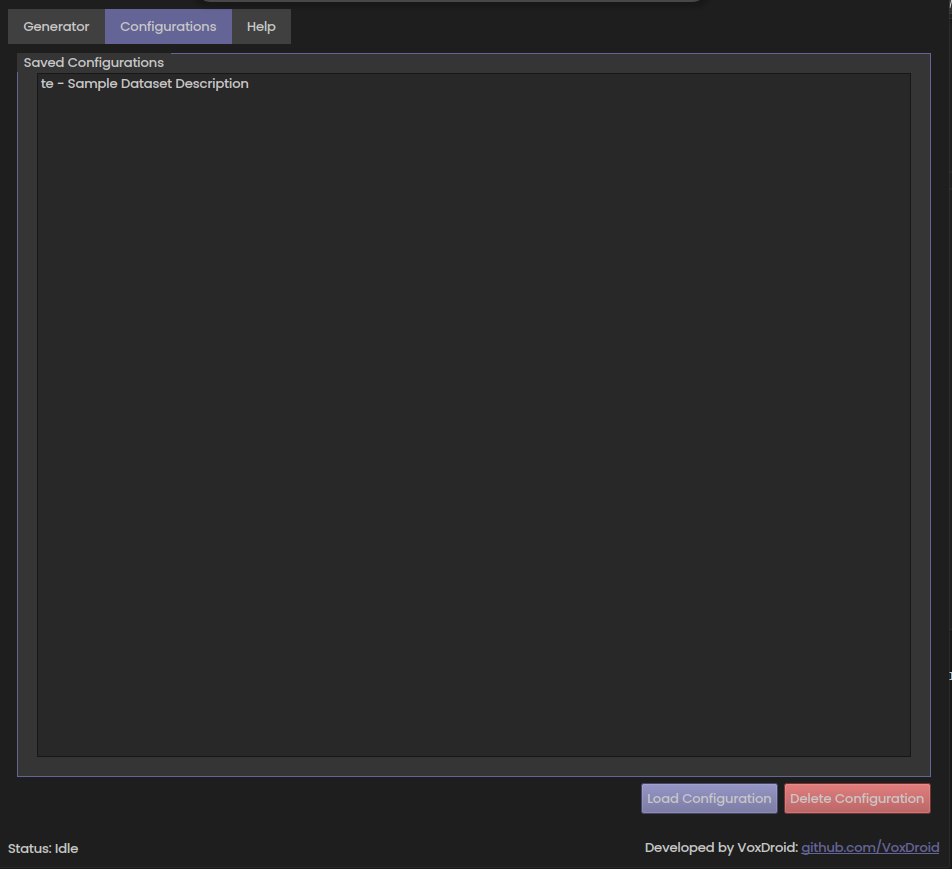
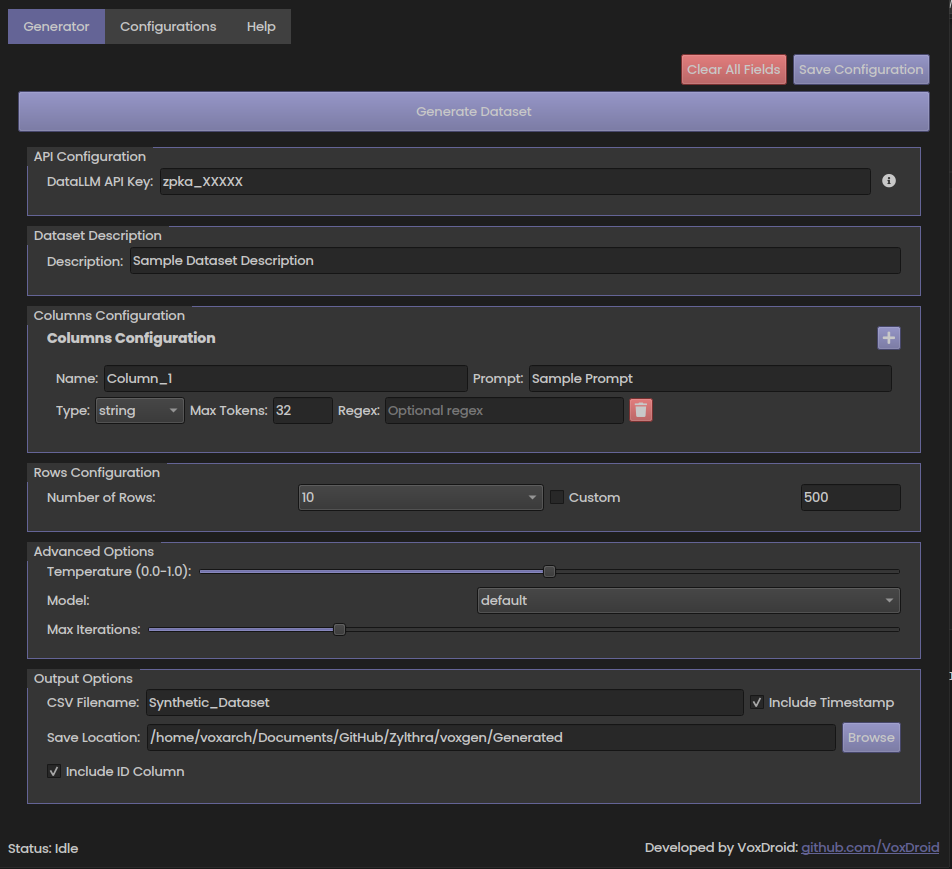
Upon launching Zylthra, you’ll see a tabbed interface with three sections: Generator, Configurations, and Help. The Generator tab is for creating datasets, Configurations manages saved setups, and Help provides detailed guidance.
Getting Started
- Obtain a DataLLM API key from data.mostly.ai.
- The app creates a
voxgendirectory in the working directory for configurations (database.db) and outputs (Generatedfolder). - Use the Help tab for a full user manual if needed.
Generator Tab
- Purpose: Design and generate synthetic datasets.
- How to Use:
- API Configuration: Enter your DataLLM API key in the "DataLLM API Key" field. Click the info icon for API docs.
- Dataset Description: Describe your dataset (e.g., "Customer purchase records").
- Columns Configuration:
- Click "+" to add a column.
- Set a unique Name (e.g., "Price").
- Write a Prompt (e.g., "Cost of an item in USD").
- Choose a Type (string, integer, float, etc.).
- Set Max Tokens (1-64).
- Optional: Add a Regex (e.g., "[0-9]+") or Categories (e.g., "Low, High") for category type.
- Click the trash icon to remove a column.
- Rows Configuration: Select a preset (10, 100, etc.) or check "Custom" and enter a number.
- Advanced Options:
- Adjust Temperature (0.0-1.0) for creativity.
- Select a Model (default, mostlyai/datallm-v2-mistral-7b-v0.1, etc.).
- Set Max Iterations (1-5) for text refinement.
- Output Options:
- Enter a CSV Filename (e.g., "SalesData").
- Check "Include Timestamp" for a dated suffix.
- Set a Save Location (click "Browse" to change).
- Check "Include ID Column" to add an ID field.
- Generate: Click "Generate Dataset" to start. Use "Terminate Generation" to stop if needed.
- Top Buttons:
- "Save Configuration": Save your setup.
- "Clear All Fields": Reset to defaults (confirms with dialog).
Configurations Tab
- Purpose: Manage saved dataset configurations.
- How to Use:
- View saved configs in the list (format: "Name - Description").
- Load Configuration: Select a config and click to load (confirms with dialog), or double-click it.
- Delete Configuration: Select a config and click to delete (confirms with dialog).
Help Tab
- Purpose: Access embedded documentation.
- How to Use: Navigate to the Help tab for a detailed guide, including setup instructions, usage tips, and support links.
Screenshots
Here are previews of the main tabs in Zylthra:
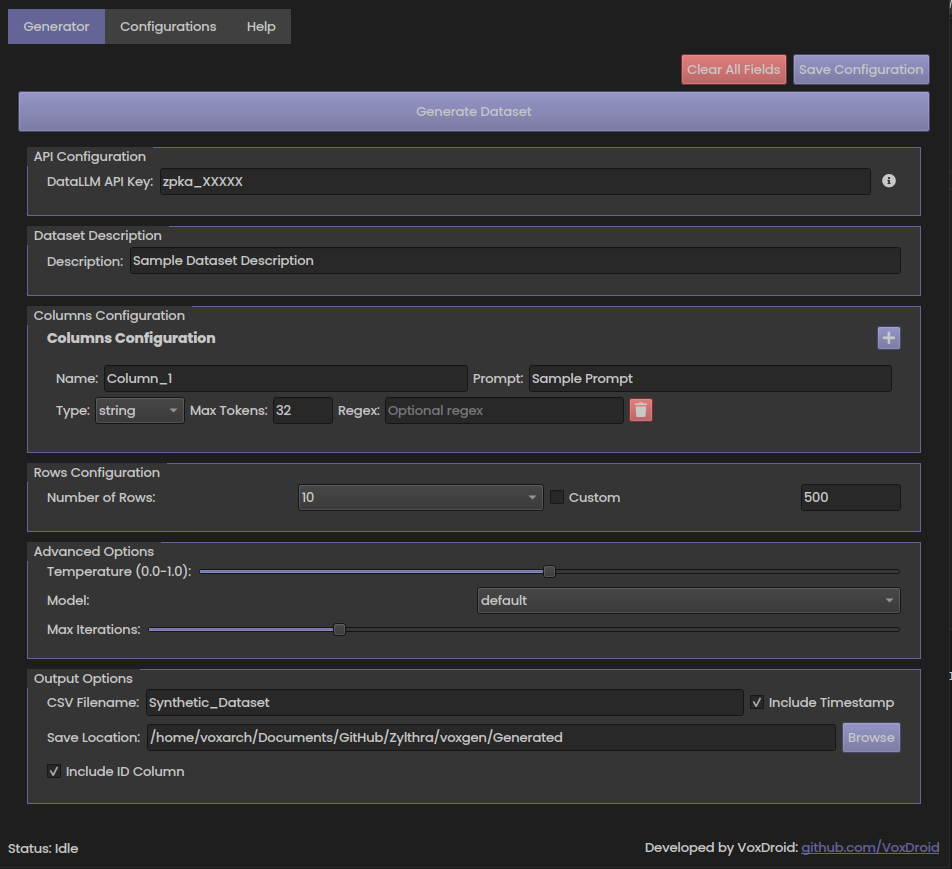
Generator Tab |
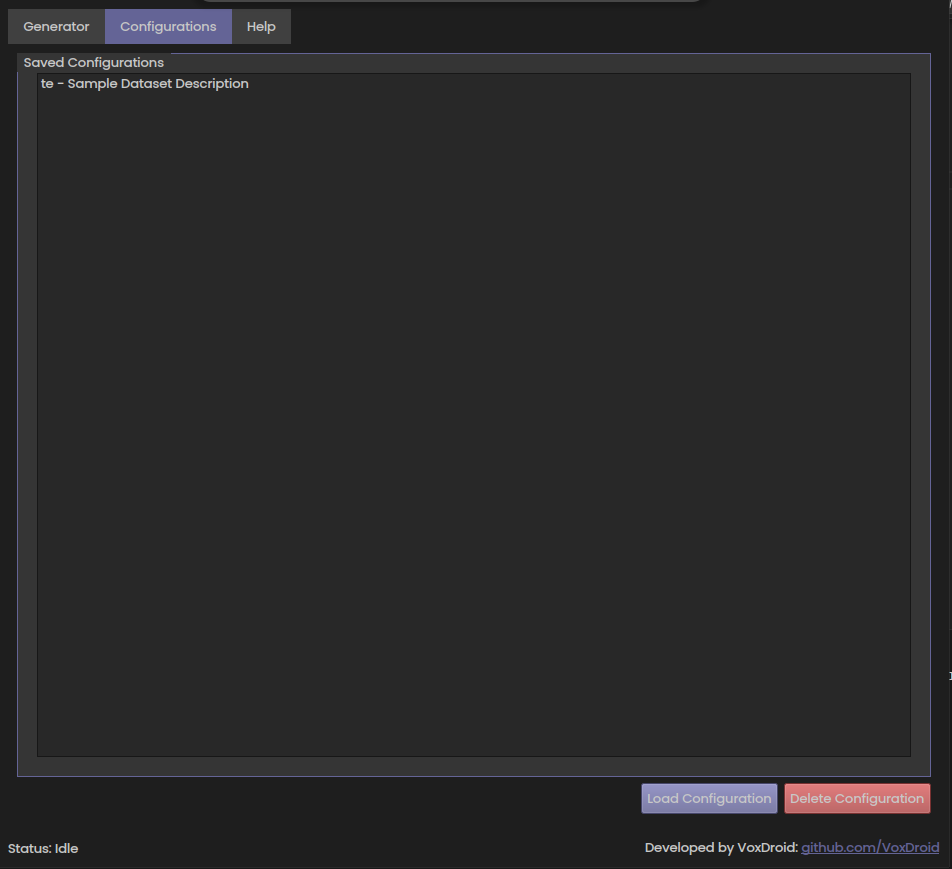
Configurations Tab |
Releases
- Check the Releases page for version updates and release notes.
- Currently, Zylthra is distributed as Python source code.
Support
For detailed support options, see the Support page. You can:
- Access the in-app Help tab for a user manual.
- Engage with the community on the Discussions tab.
- Report bugs or suggest features on the Issues page.
- Contact maintainers at izeno.contact@gmail.com.
Contributing
Contributions are welcome! To get involved, follow the Contributing Guidelines. Submit pull requests, report bugs, or suggest features while adhering to our Code of Conduct.
Security
If you discover a security vulnerability, please follow our Security Policy by reporting it to izeno.contact@gmail.com or opening a private issue labeled "Security Violation."
Code of Conduct
We are committed to fostering a welcoming community. Please review our Code of Conduct to understand the expected behavior for all contributors and users.
License
This project is licensed under the MIT License. Use, modify, and distribute it freely per the license terms.
Dependencies
To build from source, install the following Python packages:
PyQt6(for the GUI)pandas(for data handling)datallm(for synthetic data generation)qtawesome(for icons)
Create a requirements.txt file with these dependencies and run pip install -r requirements.txt.

