Desktop App · Featured act Nº 1
KemonoDownloader
Kemono Downloader - A cross-platform Python app built with PyQt6 to download posts and creator content from Kemono.cr, Coomer.st, and Pawchive.pw. Supports concurrent downloads, file deduplication, and customizable settings.
The facts
- Type
- Desktop App
- Status
- Active
- Language
- Python
- Stars
- 382
- Forks
- 48
- Started
- Mar 10, 2025
- Last push
- Nov 20, 2026
- Latest release
- v5.16.0
- coomer
- coomer-downloader
- coomer-party
- coomer-su
- crossplatform
- desktop-application
- downloader
- gui
- kemono
- kemono-api
- kemono-downloader
- kemono-party
- kemono-party-downloader
- kemono-su
- kemono-su-downloader
- kemonosu
- open-source
- pyqt6
- python
- voxdroid
Inks used
- Python 90.1%
- JavaScript 6.7%
- HTML 2.2%
- CSS 0.9%
Stills
From the README
KemonoDownloader













Important: KemonoDownloader is now a legacy project. Version 5.16.0 is its final release.
Its successor is Pawchive Downloader, rebuilt from scratch as a native desktop app for Windows, macOS and Linux. It downloads from Pawchive, Kemono and Coomer like KemonoDownloader does, also follows the Mega, Google Drive, Dropbox, Pixeldrain, GoFile and MediaFire links that posts share, and is a download of about 6 MB instead of 54 to 82 MB. Official builds are on Ko-fi.
KemonoDownloader stays available and open source, but it gets no new features or site updates. See Moving to Pawchive Downloader for why and how the two compare.
Welcome to $\color{#546e7a}{\sf{\text{KemonoDownloader}}}$, a versatile Python-based desktop application built with PyQt6, designed to download content from Kemono.cr, Coomer.st, and Pawchive.pw. This tool enables users to archive individual posts or entire creator profiles from services like Patreon, Fanbox, and more, supporting a wide range of file types with customizable settings and advanced features.
$\color{#546e7a}{\sf{\text{Moving to Pawchive Downloader}}}$
KemonoDownloader began as a small PyQt6 app for Kemono and grew tab by tab, release by release. Its Python and Qt foundation made it large to ship (54 to 82 MB on Windows) and hard to extend with things like downloads that survive a restart, outside file hosts, a watchlist and a single queue. Rather than keep patching it, the whole app was rebuilt as Pawchive Downloader, with a Rust download engine and a native interface (Tauri and Svelte).
Pawchive Downloader keeps what KemonoDownloader does well, including the polite request limits it introduced, and adds what it never had:
- Much smaller and native: a Windows download of about 6 MB, with a setup installer, MSI and portable build for Windows, one universal DMG for Apple Silicon and Intel Macs, and an AppImage, deb and rpm for Linux.
- More than the three sites: files that posts share on Mega (decrypted on your computer), Google Drive, Dropbox, Pixeldrain, GoFile and MediaFire are downloaded with the post, and ZIP archives can be unpacked with the passwords the post mentions.
- Downloads that don't get stuck: every file resumes after a pause, a dropped connection or a restart, is checked against the site's SHA-256, and is retried later by itself if it fails. Dead Kemono and Coomer media servers are noticed before a download starts, with the choice to cancel, take thumbnails instead, or queue the full files for later.
- Keeping up with creators: creator search by name, a watchlist that checks for new posts and can download them automatically, read markers, statistics and a check that finds deleted or moved files.
- Actively developed: new features and site updates go into Pawchive Downloader from now on.
$\color{#90a4ae}{\sf{\text{KemonoDownloader and Pawchive Downloader Compared}}}$
| KemonoDownloader 5.16.0 (legacy) | Pawchive Downloader 2.0.0 | |
|---|---|---|
| Status | Final release; fixes only if something is badly broken | Actively developed |
| Built with | Python and PyQt6 | Rust and Svelte (Tauri), native app |
| Windows download | 54 MB portable EXE, 82 MB MSI | About 6.4 MB (zip) |
| Installers | MSI, portable EXE, DMG for Apple Silicon and for Intel, deb, rpm, Arch package | Setup EXE, MSI, portable, universal DMG, AppImage, deb, rpm |
| Sites | Kemono, Coomer, Pawchive | Kemono, Coomer, Pawchive, and old kemono.su and coomer.su links |
| Finding creators | Paste a link | Paste a link, or search creators by name (about 100,000 on Pawchive) |
| Before downloading | List a post's files with previews; list a creator's posts | Browse posts with thumbnails, creators with banner and linked accounts, recent posts per site, and an image viewer |
| Mega, Google Drive, Dropbox, Pixeldrain, GoFile, MediaFire | No | Yes, Mega decrypted on your computer |
| ZIP archives | Saved as they are | Optionally unpacked, trying the passwords the post mentions |
| Download formats | Separate files | Separate files, one ZIP per post, or thumbnails only |
| Interrupted downloads | Partial file removed and downloaded again | Resumed from where they stopped, even after a restart |
| File checks | Size checked against what the server announced; duplicates skipped by URL | SHA-256 of every file; duplicates skipped by content across posts, creators and sites |
| Dead media servers | Separate Thumbnail Downloader tab | Checked before each download: cancel, thumbnails instead, or queue for later |
| Preview-only Pawchive files | Recognised and skipped, or preview saved | Full file fetched through the post's temporary link |
| Failed files | Retried right away, then given up | Retried right away, then again by themselves after 15 minutes to 3 hours |
| Queue | One queue per tab | One queue: pause, resume, reorder, retry single files; survives a crash or restart |
| Filters | File types, and a post title search in the Creator tab | File types and extensions, keywords, skip words, regular expressions, date range, newest N posts |
| File names | Creator file name template and folder layout | Folder, file and ZIP templates with live preview, words to remove |
| Post text and metadata | Post description (Thumbnail tab) | Description as text or HTML, post.json, outside links and passwords, comments, announcements |
| Watchlist | No | Scheduled checks, notifications, automatic downloads |
| History and favorites | Yes | Yes, plus statistics and a check for deleted or moved files |
| Running in the background | No | Tray, start at sign-in, notifications, quit, sleep or shut down when done |
| Scheduling and limits | No | Download window (for example at night), speed limit, free-space guard, keep awake |
| Proxy and Tor | Custom proxy or Tor, with a built-in verified Tor download | System proxy, custom HTTP, HTTPS or SOCKS5 proxy, or Tor |
| Portable mode and backup | Portable EXE; settings kept in your user account | data folder next to the program; backup and restore of settings, watchlist, favorites and history |
| Languages | 4 | 9 |
| Themes | 5 dark themes | 6 themes including Light, Match system, and accent colors |
$\color{#90a4ae}{\sf{\text{What Happens to KemonoDownloader}}}$
- The source code, the releases and the 5.16.0 builds stay available, and the app keeps working as long as the sites don't change in ways that break it.
- There will be no new features or site updates. Issues and pull requests may still be looked at, but fixes are unlikely unless something is badly broken.
- Monthly supporters on Ko-fi get Pawchive Downloader builds as part of their support.
- To switch, install Pawchive Downloader and point it at the same download folder. The two apps keep their settings, history and favorites separately, so nothing is moved over automatically.
$\color{#546e7a}{\sf{\text{Important Notices}}}$
$\color{#90a4ae}{\sf{\text{Disclaimer}}}$
KemonoDownloader is a tool designed for personal and educational use only, to assist users in downloading content from Kemono.cr, Coomer.st, and Pawchive.pw. The maintainers of this project do not condone or support the unauthorized distribution of copyrighted material. Users are solely responsible for ensuring they have the legal right to access and download content from Kemono.cr, Coomer.st, and Pawchive.pw, and for complying with all applicable laws, as well as the terms of service of the original platforms from which the content originates (e.g., Patreon, Pixiv Fanbox, Gumroad).
Misuse of this tool to infringe on creators’ rights, violate copyright laws, or breach terms of service is strictly prohibited. The maintainers are not liable for any misuse of KemonoDownloader or any consequences arising from its use, including but not limited to legal action, financial loss, or damage to third parties.
$\color{#90a4ae}{\sf{\text{Ethical Use Guidelines}}}$
KemonoDownloader interacts with content from Kemono.cr, Coomer.st, and Pawchive.pw, which may include material originally posted on paywalled platforms like Patreon, Pixiv Fanbox, and Gumroad. Many creators on these platforms rely on paid subscriptions for their livelihood. Downloading and redistributing their content without permission can harm their ability to continue creating.
We strongly encourage users to:
- Use KemonoDownloader responsibly and only for content you have the legal right to access.
- Support creators directly by subscribing to their official channels on platforms like Patreon, Pixiv Fanbox, or Gumroad.
- Avoid redistributing downloaded content, as this may violate copyright laws and harm creators.
- Respect site operators' resource limits. For Pawchive, the application identifies itself with a contactable user agent, starts at most one new file request per second, and allows at most five active file downloads across its downloaders.
$\color{#90a4ae}{\sf{\text{Risks and Limitations}}}$
- Legal Risks: Downloading content from Kemono.cr, Coomer.st, and Pawchive.pw may violate copyright laws or the terms of service of the original platforms. Users assume all legal risks associated with using this tool.
- Dependency on Kemono.cr, Coomer.st, and Pawchive.pw: KemonoDownloader relies on Kemono.cr, Coomer.st, and Pawchive.pw, which have a history of inconsistent updates and downtime. If these sites become unavailable, this tool will lose its functionality.
- Rate Limits and Errors: Kemono.cr, Coomer.st, and Pawchive.pw may impose rate limits or other restrictions that affect download performance. Pawchive downloads use request pacing and a five-download cap to reduce overload and help prevent transient HTTP 403 responses; this cannot guarantee uninterrupted access or bypass server-side access controls. When a site answers HTTP 429 (Too Many Requests), every request to that site pauses for as long as the site asks (its Retry-After, or a short growing wait) and then carries on by itself.
$\color{#90a4ae}{\sf{\text{Site Availability Status}}}$
As of August 01, 2026, primary full-resolution media download servers for Kemono.cr and Coomer.st may experience downtime, rotation, or outages. To ensure users can always archive content, Pawchive.pw serves as an alternative full-resolution media source, and the new Thumbnail Downloader tab has been introduced. Because thumbnail delivery servers (img.kemono.cr, img.coomer.st, img.pawchive.pw) remain active and operational during media server outages, the Thumbnail Downloader tab allows users to continue downloading post preview images and post text descriptions (desc_{post_id}.txt), providing a working fallback option (albeit at thumbnail resolution).
| Site / Server | Status | Last Checked |
|---|---|---|
| Kemono.cr Media Server | 🔴 Intermittent / Unavailable | November 13, 2026 |
| Coomer.st Media Server | 🔴 Intermittent / Unavailable | November 13, 2026 |
| Pawchive.pw Media Server | 🟢 Available | November 13, 2026 |
Thumbnail Delivery Servers (img.*) | 🟢 Available | November 13, 2026 |
Note: Status reflects the availability of backend media download servers. Front-end availability and thumbnail servers may vary.
$\color{#546e7a}{\sf{\text{Community Standards}}}$
We are committed to fostering a welcoming and respectful community around KemonoDownloader. Please read our Code of Conduct and Security Policy to understand the standards we expect from all contributors and users. Key points include:
- Respecting the intellectual property rights of creators.
- Refraining from using KemonoDownloader to engage in illegal activities, such as unauthorized distribution of copyrighted material.
- Reporting any violations of the Code of Conduct or security issues to the maintainers via izeno.contact@gmail.com or by opening a private issue labeled "Code of Conduct Violation" or "Security Violation."
$\color{#546e7a}{\sf{\text{Table of Contents}}}$
- Moving to Pawchive Downloader
- Important Notices
- Community Standards
- Features
- Browser Extension
- Installation
- Usage
- Screenshots
- Releases
- Support
- Contributing
- Security
- License
- Dependencies
- Special Thanks & Contributors
$\color{#546e7a}{\sf{\text{Features}}}$
KemonoDownloader offers a comprehensive set of features designed to efficiently download and manage content from Kemono.cr, Coomer.st, and Pawchive.pw. Below is a detailed breakdown organized by category.
$\color{#90a4ae}{\sf{\text{Downloading Capabilities}}}$
| Feature | Description |
|---|---|
| Post Downloader | Download files from individual posts using direct URLs. Supports previewing, filtering by file type, and batch selection. |
| Creator Downloader | Bulk download entire creator profiles or selected posts. Configurable options for main files, attachments, and content images. |
| Thumbnail Downloader | Dedicated fallback tab that downloads post/creator preview thumbnails and post descriptions (desc_{post_id}.txt) even when main media download servers are down or unavailable. |
| File Type Support | Handles images (JPG, PNG, GIF, WebP), videos (MP4, AVI, MOV), archives (ZIP, 7Z, RAR), documents (PDF, TXT), audio (MP3, WAV), and more. |
| URL Import | Import multiple creator URLs from .txt files for batch processing. |
| Fast Mode | One-click toggle that selects all file categories, locks options, and enables batch URL input for rapid bulk downloading. In Creator Downloader, auto-detects and downloads all posts for each queued creator sequentially. |
| Download UI Lock | All controls are disabled during active downloads (except Cancel and Expand Logs) to prevent accidental changes. |
| Download History | Every finished post, creator and thumbnail download is recorded with files, posts, size, duration and status. Open its folder (with recovery options if the folder was moved or deleted), copy its links, queue it again, or export the list as CSV. Recording can be paused and the history cleared at any time. |
| Preview-Only Detection | Files the site only keeps preview images of are recognised before downloading. A warning window explains them and they are skipped (or their previews saved, if you turn that on) instead of failing with 404 errors. |
| Favorites | Bookmark posts and creators with the star button in the Post or Creator tab, from the history, or by pasting a link. Edit titles and notes, see when each was last downloaded, queue them in one click, and import or export them as a .txt list. |
$\color{#90a4ae}{\sf{\text{Performance and Reliability}}}$
| Feature | Description |
|---|---|
| Concurrent Downloads | Adjustable parallel downloads (1-20 threads) for optimal performance. |
| Retry Mechanisms | Configurable retries for posts fetching, data retrieval, file downloads, and API requests. |
| File Deduplication | Prevents redundant downloads using SQLite-backed URL hashing (auto-migrates from legacy JSON). |
| Connection Pooling | Efficient HTTP connection management with gzip compression support. |
| Fast Startup | The supported-domain list loads from the bundled file and refreshes in the background, so the app never waits on the network to start. |
| Lightweight Downloads | Files are hashed while they download and progress is reported once per percent, keeping memory low and the interface responsive even for multi-gigabyte files. |
| Clear Download Reports | Files missing on the media server are reported once instead of retried, and each download ends with how many files were downloaded, only previews, missing or failed. The History tab keeps the same counts. |
| Crash Protection | An unexpected error shows a dialog with details to report instead of closing the app. |
| Safe File Handling | Server-supplied file names cannot escape the download folder, partial files are removed after a failed download, and large downloads are never reported complete early. |
$\color{#90a4ae}{\sf{\text{User Interface and Experience}}}$
| Feature | Description |
|---|---|
| Cross-Platform GUI | Modern PyQt6 interface for Windows, macOS, and Linux. |
| Multilingual Support | Dynamic language switching between English, Japanese, Korean, and Simplified Chinese. |
| Media Playback | Built-in video and GIF preview with play/pause/seek/volume controls. |
| Real-time Logging | In-app console with progress bars and detailed status updates, plus a full logs window with search, Copy All and Save that keeps your place while new lines arrive. |
| Consistent Design | One theme styles every tab and window: the same buttons, fields, lists, progress bars and tabs everywhere, with the main action of each screen highlighted. |
| Themes | Five dark colour themes (Midnight, Graphite, Plum, Forest and Ember), chosen in Settings. |
| Built-in Guide | A searchable Help guide covering every tab and setting, a short note at the top of every section explaining what it's for, and tooltips on the controls. |
| Smooth Interface | Tabs are prepared while the intro is showing so Launch is instant; crossfades between screens and tabs, gliding mouse-wheel scrolling, and progress bars that ease to new values. |
$\color{#90a4ae}{\sf{\text{Advanced Features}}}$
| Feature | Description |
|---|---|
| Proxy Support | Tor integration and custom proxy configuration. With Tor selected, downloads only go through Tor, and the built-in Tor download is verified against Tor's published checksums. |
| Automatic Updates | Optional version checking with download notifications. |
| Organized Storage | Automatic directory creation (Downloads, Cache, Other Files) with customizable paths. |
| User Agents | Realistic browser user agents on Kemono and Coomer; on Pawchive the app identifies itself, as the site asks. |
$\color{#90a4ae}{\sf{\text{Settings and Customization}}}$
$\color{#90a4ae}{\sf{\text{Download Settings}}}$
| Setting | Description | Default | Range |
|---|---|---|---|
| Simultaneous Downloads | Number of parallel threads | 5 | 1-20 |
| Creator Posts Max Attempts | Max attempts to fetch posts | 200 | 1-1000 |
| Post Data Max Retries | Retries for post data | 7 | 1-100 |
| File Download Max Retries | Retries for files | 50 | 1-200 |
| API Request Max Retries | Retries for API calls | 3 | 1-50 |
| Save Preview Images | When the site only has a file's preview image, save that preview instead (named like 00501_preview.png) | Off | On/Off |
$\color{#90a4ae}{\sf{\text{Folder Settings}}}$
- Base Directory: Custom root path for downloads
- Folder Name: Configurable app data folder name
- Platform Defaults: Auto-detection of appropriate directories per OS
$\color{#90a4ae}{\sf{\text{Font Settings}}}$
| Setting | Description | Default | Options |
|---|---|---|---|
| Font | Application-wide font family (bundled Google Fonts) | JetBrains Mono | JetBrains Mono, Poppins |
$\color{#90a4ae}{\sf{\text{Help and Documentation}}}$
| Feature | Description |
|---|---|
| Embedded Help | Comprehensive in-app manual with usage guides |
| Contextual Guidance | Step-by-step instructions for each feature |
| Troubleshooting | Built-in solutions for common issues |
$\color{#90a4ae}{\sf{\text{Platform Support}}}$
| Platform | Support Details |
|---|---|
| Windows | Native .exe builds, portable and installer options |
| macOS | Builds for Apple Silicon and Intel |
| Linux | Packages for Arch, Fedora, Ubuntu, and other distributions |
$\color{#90a4ae}{\sf{\text{Security and Privacy}}}$
| Feature | Description |
|---|---|
| Local Storage | All data stored locally with user-specified paths |
| No Data Collection | No transmission of user data. Download history and favorites stay on your computer in library.db; recording can be paused and the history cleared at any time |
| HTTPS Only | Secure connections to Kemono.cr, Coomer.st, and Pawchive.pw APIs |
| Ethical Design | Promotes legal and responsible content access |
$\color{#546e7a}{\sf{\text{Browser Extension}}}$
KemonoDownloader also includes a standalone browser extension that provides an alternative way to download content directly from your browser. This extension works independently from the desktop application and offers a streamlined experience for individual post downloads.
$\color{#90a4ae}{\sf{\text{Core Features}}}$
- Download individual posts or multiple files from Kemono/Coomer pages
- Selective file downloads with checkbox selection
- ZIP compression for multiple files with progress tracking
- Individual downloads for large video files
- Automatic file organization and naming
- Compatible with both kemono.cr and coomer.st
$\color{#90a4ae}{\sf{\text{How It Works}}}$
The extension automatically detects when you're on a Kemono or Coomer post page and provides a download interface. You can select which files to download and choose between ZIP compression or individual file downloads.
Download Options:
- Selective Downloads: Choose specific files using checkboxes
- ZIP Compression: Download multiple files as a single compressed archive
- Individual Files: Download large files separately for better performance
- Progress Tracking: Monitor download progress in real-time
Files are downloaded directly to your browser's default download folder.
$\color{#90a4ae}{\sf{\text{Installation}}}$
-
Download the extension package from the GitHub Releases
-
Extract the ZIP file to a folder on your computer
-
Choose the correct manifest for your browser and copy it to
manifest.jsoninside the unpacked extension folder. This repository includes two per-browser manifests in thebrowser-extension/directory:- Chrome/Edge (Manifest V3):
browser-extension/chrome_manifest.json - Firefox (Manifest V2):
browser-extension/firefox_manifest.json
Quick copy commands:
- PowerShell (Windows):
Copy-Item .\browser-extension\chrome_manifest.json .\browser-extension\manifest.jsonCopy-Item .\browser-extension\firefox_manifest.json .\browser-extension\manifest.json
- Bash (macOS / Linux):
cp browser-extension/chrome_manifest.json browser-extension/manifest.jsoncp browser-extension/firefox_manifest.json browser-extension/manifest.json
Note:
browser-extension/manifest.jsonin this repository is a small placeholder file that explains how to choose and copy the proper per-browser manifest; please replace it with the appropriate manifest file before loading the extension. - Chrome/Edge (Manifest V3):
-
Follow the browser-specific installation instructions:
- Chrome/Edge: Enable Developer mode and load the unpacked extension (select the
browser-extensiondirectory) - Firefox: Use the debugging console to load the temporary add-on (select the
manifest.jsonin thebrowser-extensiondirectory)
- Chrome/Edge: Enable Developer mode and load the unpacked extension (select the
For more details and troubleshooting, see browser-extension/README.md. The extension works with Chrome, Edge, and other Chromium-based browsers, as well as Firefox.
$\color{#546e7a}{\sf{\text{Installation}}}$
Kemono Downloader is now packaged using Briefcase, making it easier to run or distribute as a native application across platforms. You can either build from source or use pre-compiled binaries where available.
$\color{#90a4ae}{\sf{\text{Pre-Compiled Binaries - Executable}}}$
Pre-compiled binaries are available through contributions on Ko-fi. If you’d like the convenience of ready-to-run executables instead of building from source, please support the project here: Get binaries on Ko-fi
$\color{#90a4ae}{\sf{\text{Available Binaries}}}$
From 5.16.0, each build comes as a zip holding the installer, a README.txt with install steps, and the license:
- Windows:
- Installer:
KemonoDownloader-5.16.0-windows-x64-msi.zip - Portable:
KemonoDownloader-5.16.0-windows-x64-portable.zip
- Installer:
- macOS:
KemonoDownloader-5.16.0-macos-apple-silicon.zip(Apple Silicon)KemonoDownloader-5.16.0-macos-intel.zip(Intel)
- Linux:
KemonoDownloader-5.16.0-linux-x64-arch.zip(Arch-based)KemonoDownloader-5.16.0-linux-x64-rpm.zip(Fedora/Red Hat based)KemonoDownloader-5.16.0-linux-x64-deb.zip(Debian/Ubuntu based)
Support ongoing development and get access here: Ko-fi Binaries Page. Monthly supporters also get builds of Pawchive Downloader, KemonoDownloader's successor.
$\color{#90a4ae}{\sf{\text{Building with Briefcase (All Platforms)}}}$
- Ensure you have Python 3.9+ installed on your system (Windows, macOS, Linux).
- Clone this repository:
git clone https://github.com/VoxDroid/KemonoDownloader.git cd KemonoDownloader - Create and activate virtual environment:
python -m venv .venv .venv\Scripts\activate # Windows source .venv/bin/activate # Linux - Install dependencies:
python -m pip install -r requirements.txt- Linux only: Qt 6.5+ needs the
xcb-cursorlibrary, which some desktops (for example Linux Mint) don't install by default. If the app fails to start withCould not load the Qt platform plugin "xcb", install it:- Debian/Ubuntu/Mint:
sudo apt install libxcb-cursor0 - Fedora/RHEL:
sudo dnf install xcb-util-cursor - Arch:
sudo pacman -S xcb-util-cursor - openSUSE:
sudo zypper install libxcb-cursor0
- Debian/Ubuntu/Mint:
- Linux only: Qt 6.5+ needs the
- Build the application:
- Windows:
briefcase build windows - macOS:
briefcase build macos - Linux:
briefcase build linux - General:
briefcase build(Recommended)
- Windows:
- Run the application:
- Windows:
briefcase run windows - macOS:
briefcase run macos - Linux:
briefcase run linux - General:
briefcase dev(Recommended) - Note: An internet connection is required to fetch content from Kemono.cr, Coomer.st, and Pawchive.pw.
- Windows:
$\color{#546e7a}{\sf{\text{Usage}}}$
Upon launching, you’ll see an introductory screen with a "Launch" button. Click it to enter the main interface, featuring seven tabs: Post Downloader, Creator Downloader, Thumbnail Downloader, History, Settings, Help, and Browser Extension. The in-app Help tab contains a comprehensive user manual.
$\color{#90a4ae}{\sf{\text{Getting Started}}}$
- The application creates default directories (
Downloads,Cache,Other Files) in the specified save location. - Ensure an active internet connection to access Kemono.cr, Coomer.st, and Pawchive.pw content.
- Explore the Help tab for detailed instructions and troubleshooting tips.
$\color{#90a4ae}{\sf{\text{Post Downloader Tab}}}$
- Purpose: Download files from individual Kemono.cr, Coomer.st, and Pawchive.pw posts.
- How to Use:
- Enter a post URL (e.g.,
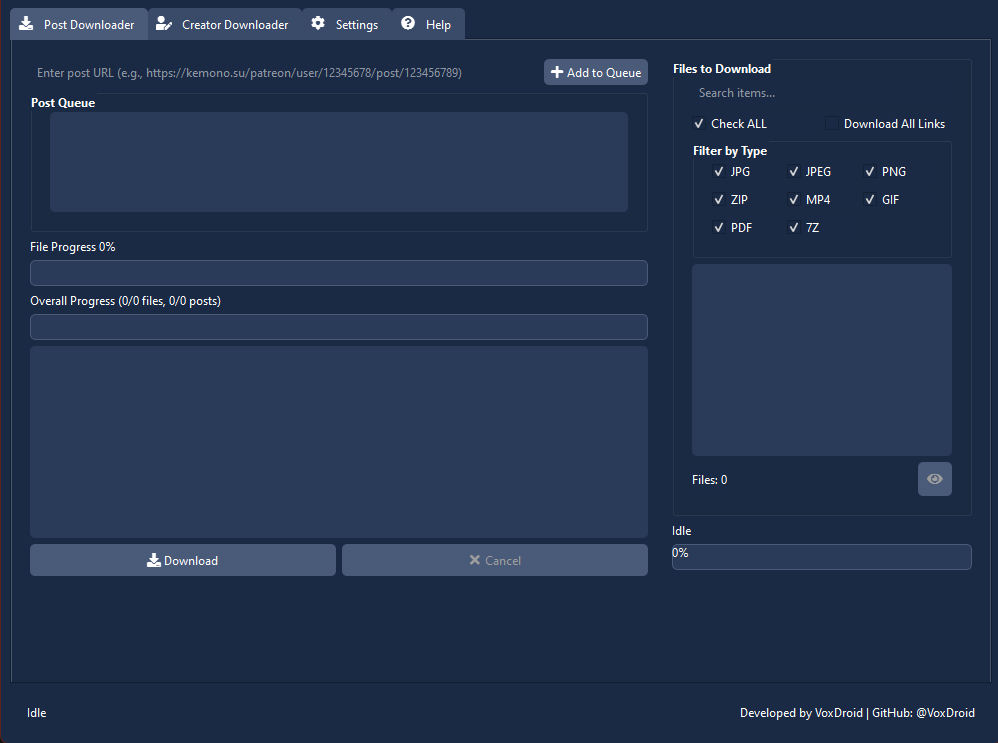
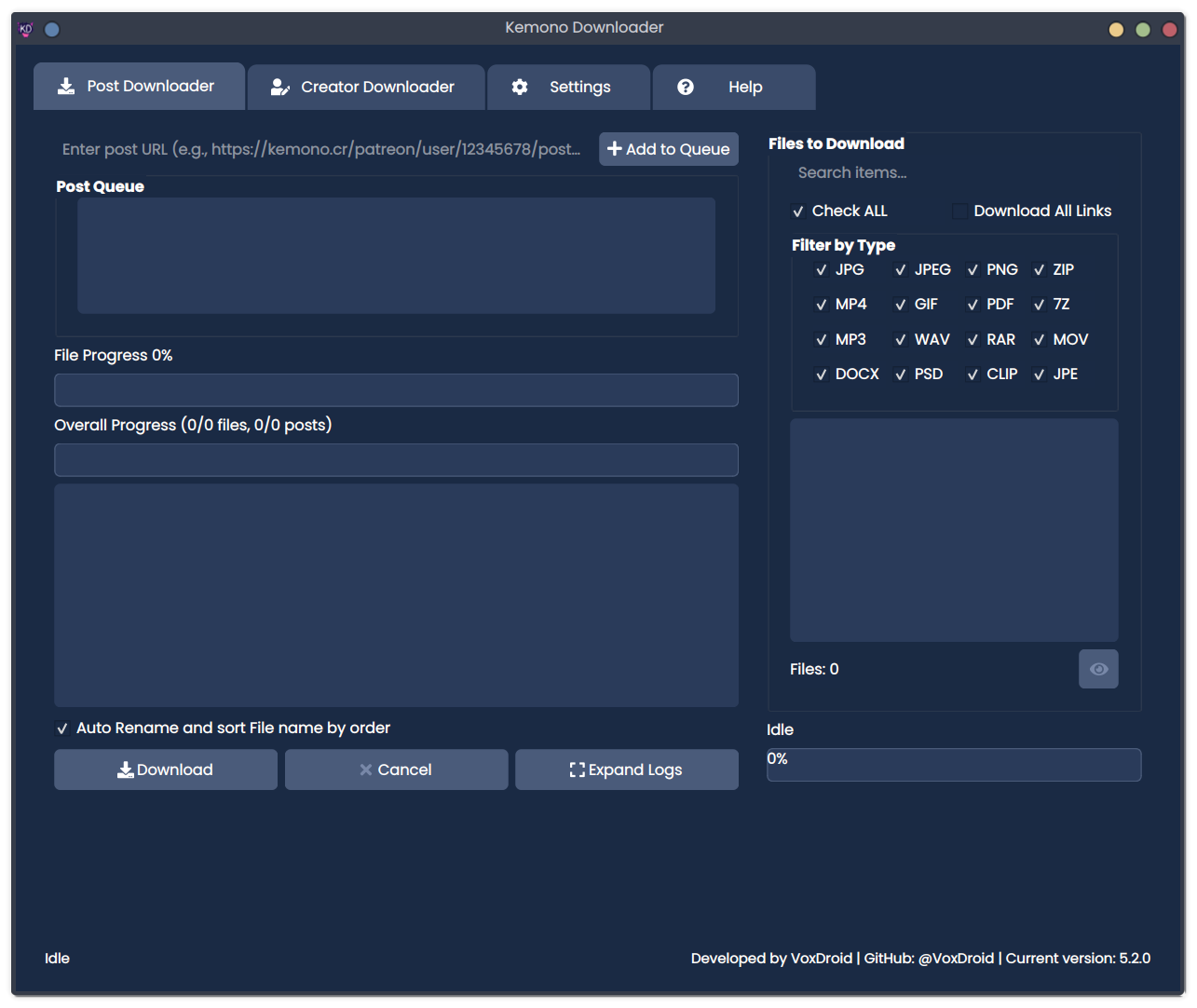
https://kemono.cr/patreon/user/123456789/post/123456789orhttps://coomer.st/patreon/user/123456789/post/123456789) in the "Enter post URL" field. - Click "Add to Queue" to add it to the list.
- Click the eye icon to view files, filter by type (e.g., JPG, ZIP), and select files to download.
- Click "Download" to start, and monitor progress with the progress bars and console.
- Enter a post URL (e.g.,
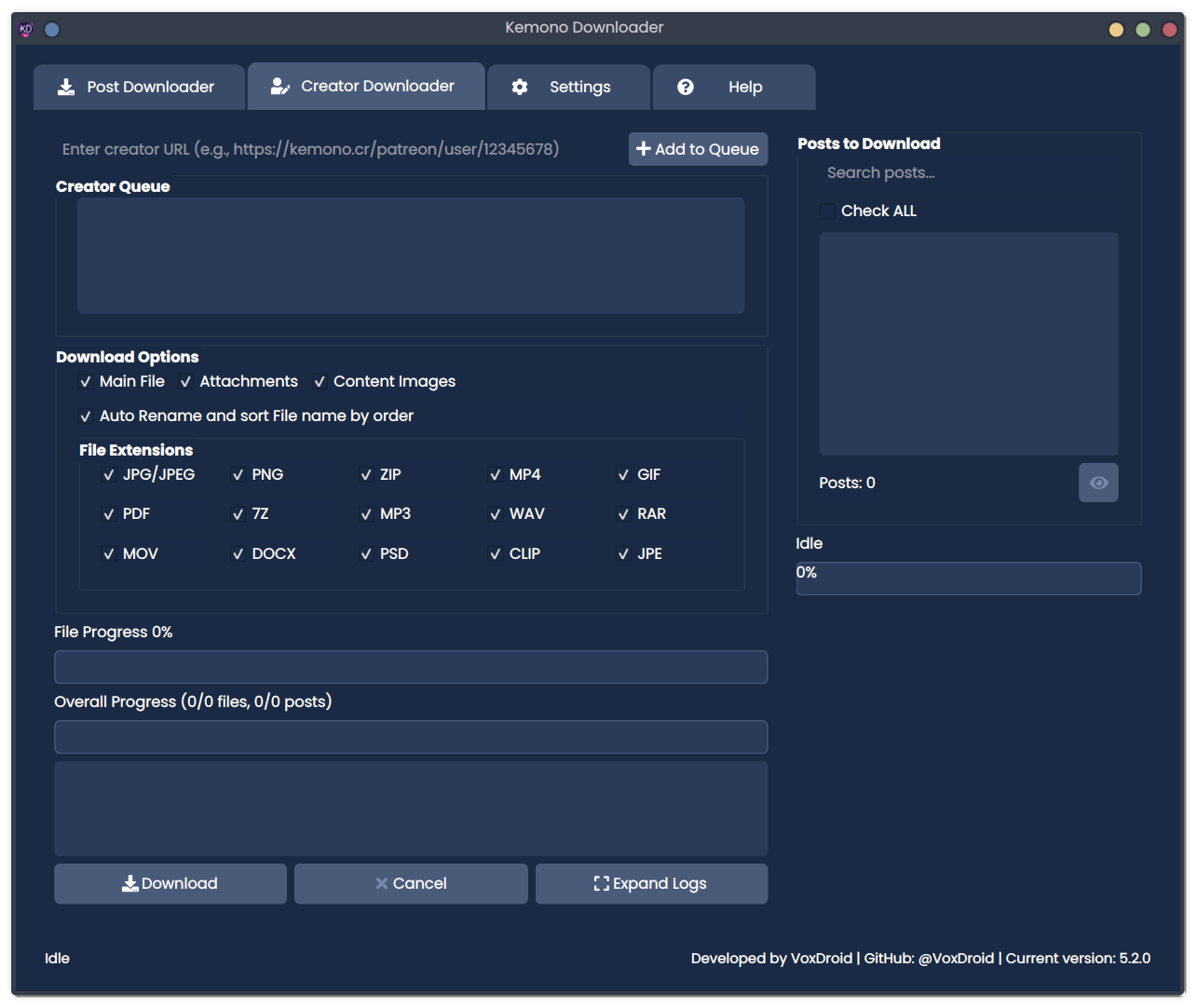
$\color{#90a4ae}{\sf{\text{Creator Downloader Tab}}}$
- Purpose: Bulk download content from a creator's profile.
- How to Use:
- Enter a creator URL (e.g.,
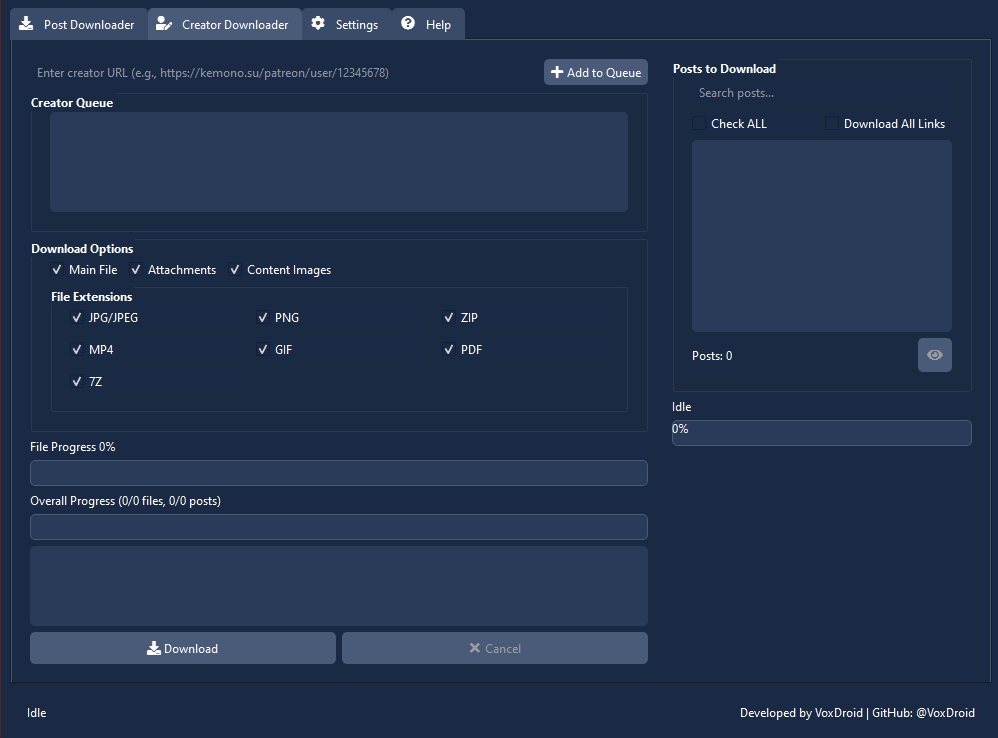
https://kemono.cr/patreon/user/123456789orhttps://coomer.st/patreon/user/123456789) in the "Enter creator URL" field. - Click "Add to Queue" to add it to the list.
- Click the eye icon to fetch posts, configure options (Main File, Attachments, Content Images), and select posts.
- Click "Download" to begin, and track progress via the interface.
- Enter a creator URL (e.g.,
$\color{#90a4ae}{\sf{\text{Thumbnail Downloader Tab}}}$
- Purpose: Download thumbnails and post text descriptions when primary media servers are down or offline.
- How to Use:
- Select Post Mode or Creator Mode from the mode selector.
- Enter post or creator URLs in the queue.
- Click "Detect Thumbnails" to scan and list thumbnail images.
- Configure "Auto Rename and sort File name by order" and "Download Post Text" options as desired.
- Click "Start Download" to archive thumbnails and post text descriptions into organized creator/post folders.
$\color{#90a4ae}{\sf{\text{History Tab}}}$
- Purpose: Look back at what you downloaded and keep a list of favorite posts and creators.
- How to Use:
- Open the History tab to see finished downloads; search, filter by type, or sort any column.
- Select rows to open their folder, copy links, add them back to a queue, or save them to Favorites. If a folder no longer exists you can locate it, open its parent folder, or download it again.
- Switch to Favorites to manage saved links: paste a link and press Save, double-click a title or note to edit it, or double-click a row to queue it.
- Untick "Record download history" to pause recording. History and favorites are stored in
library.dbinside the app's "Other Files" folder; removing entries never deletes downloaded files.
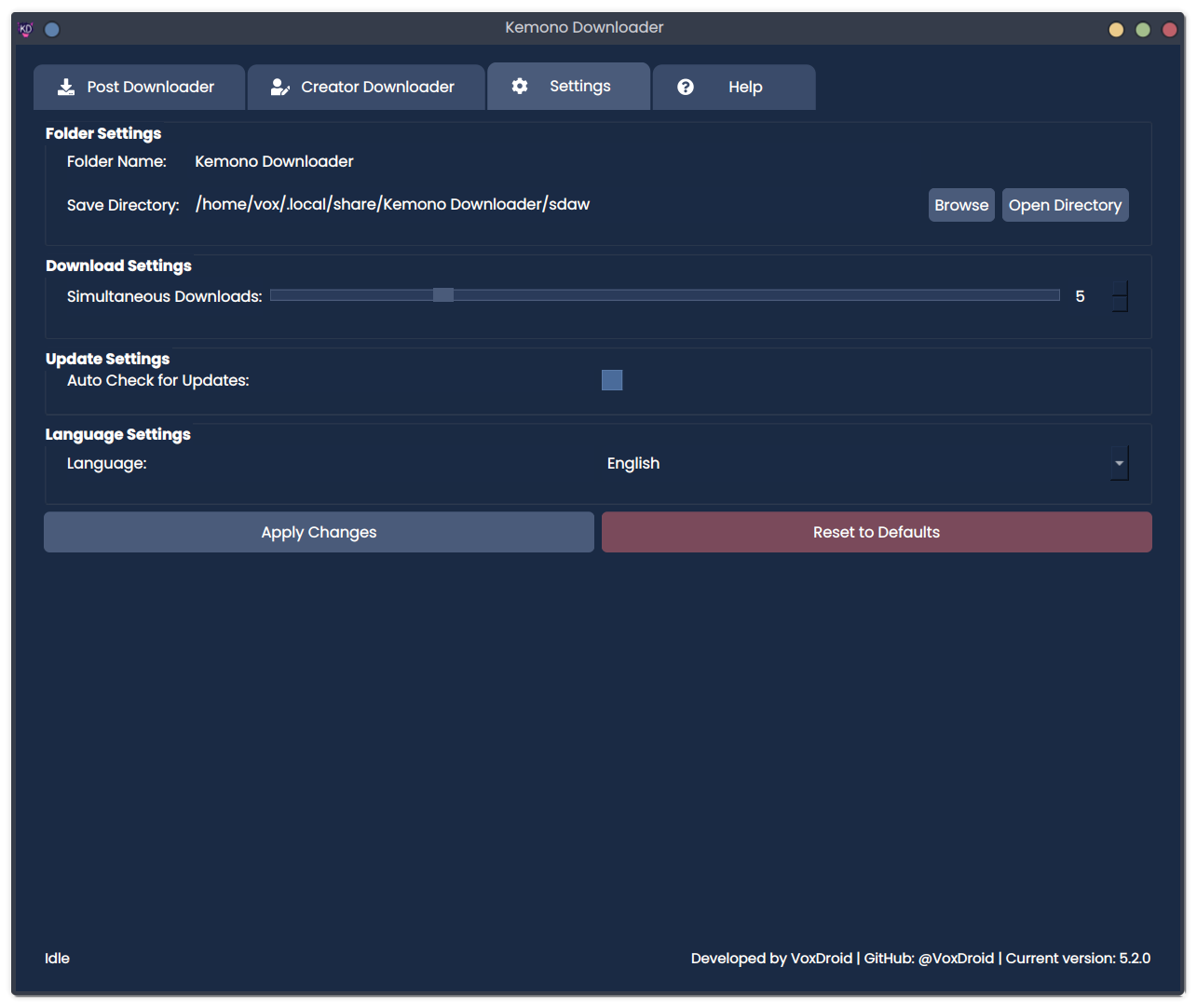
$\color{#90a4ae}{\sf{\text{Settings Tab}}}$
- Purpose: Customize the application’s behavior.
- How to Use:
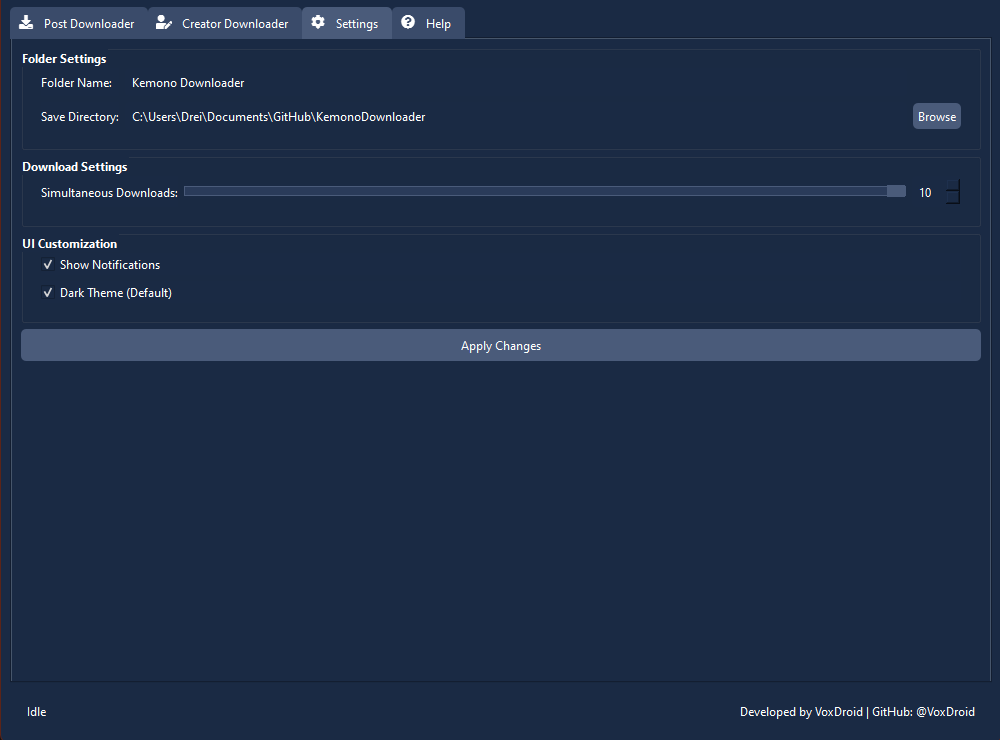
- Set the folder name and save directory for downloads.
- Adjust simultaneous downloads (1-20) using the slider or spinbox.
- Click "Apply Changes" to save.
$\color{#90a4ae}{\sf{\text{Help Tab}}}$
- Purpose: Access the embedded user manual.
- How to Use: Navigate to the Help tab to read detailed guides, examples, and support information.
$\color{#546e7a}{\sf{\text{Screenshots}}}$
Here are previews of the main tabs in Kemono Downloader:
Post Downloader Tab |
Creator Downloader Tab |
Settings Tab |
$\color{#546e7a}{\sf{\text{Releases}}}$
- 5.16.0 is the final release. New versions come from Pawchive Downloader.
- Pre-compiled binaries for Windows (
.exe,.msi), macOS (.dmgfor Apple Silicon and Intel) and Linux (.deb,.rpm,.pkg.tar.zst) are available on Ko-fi. See Pre-Compiled Binaries for the full list. - The GitHub Releases page has the release notes and source code for every version.
- Building from source with Briefcase is free and works on every platform; see Building with Briefcase.
$\color{#546e7a}{\sf{\text{Support}}}$
For ways to get help, report issues, or support the project’s development, please see the Support page.
$\color{#546e7a}{\sf{\text{Contributing}}}$
Kemono Downloader is open-source, and contributions are encouraged! Please read our Contributing Guidelines, Code of Conduct, and Security Policy before submitting issues or pull requests. Use the appropriate issue templates for reporting bugs, suggesting features, or other contributions, and the Pull Request template for code submissions.
$\color{#546e7a}{\sf{\text{Security}}}$
If you discover a security vulnerability, please follow our Security Policy by emailing izeno.contact@gmail.com or using the Security Report issue template for non-sensitive issues.
$\color{#546e7a}{\sf{\text{License}}}$
This project is licensed under the MIT License. Use, modify, and distribute it freely per the license terms.
$\color{#546e7a}{\sf{\text{Dependencies}}}$
To build from source, install the following Python packages:
PyQt6(for the GUI)requests(for HTTP requests)beautifulsoup4(for HTML parsing)qtawesome(for icons)briefcase(for packaging the app)
Create a requirements.txt file with these dependencies and run pip install -r requirements.txt.
$\color{#546e7a}{\sf{\text{Special Thanks and Contributors}}}$
We’re incredibly grateful to our amazing contributors who have helped shape Kemono Downloader into what it is today.
$\color{#90a4ae}{\sf{\text{Contributor Profiles}}}$


$\color{#546e7a}{\sf{\text{Project Star Statistics}}}$
Check out how Kemono Downloader is doing in the GitHub community!
$\color{#546e7a}{\sf{\text{Star History}}}$
Developed by VoxDroid
GitHub | Ko-fi
Releases
Latest commits
- Merge pull request #109 from VoxDroid/docs/pawchive-buttonb0d24f4 · Nov 20, 2026
- Keep the Releases section's Pawchive button on the page191a2af · Nov 20, 2026
- Link Pawchive Downloader's buttons to its Ko-fi shop paged14496b · Nov 20, 2026
- Show Pawchive Downloader's download button in the READMEsf93c081 · Nov 20, 2026
- Merge pull request #108 from VoxDroid/site/pawchive-successor12bb34c · Nov 20, 2026
- Point the website to Pawchive Downloader947f4bf · Nov 20, 2026
- Merge pull request #106 from VoxDroid/docs/download-button540d8c5 · Nov 20, 2026
- Replace the SourceForge download button with KemonoDownloader's ownca74eb3 · Nov 20, 2026